others
Nook vs Kindle: Which E-Reader Is Right for You?
Published
1 year agoon
By
Hamari Web
Table of Contents
ToggleIntroduction
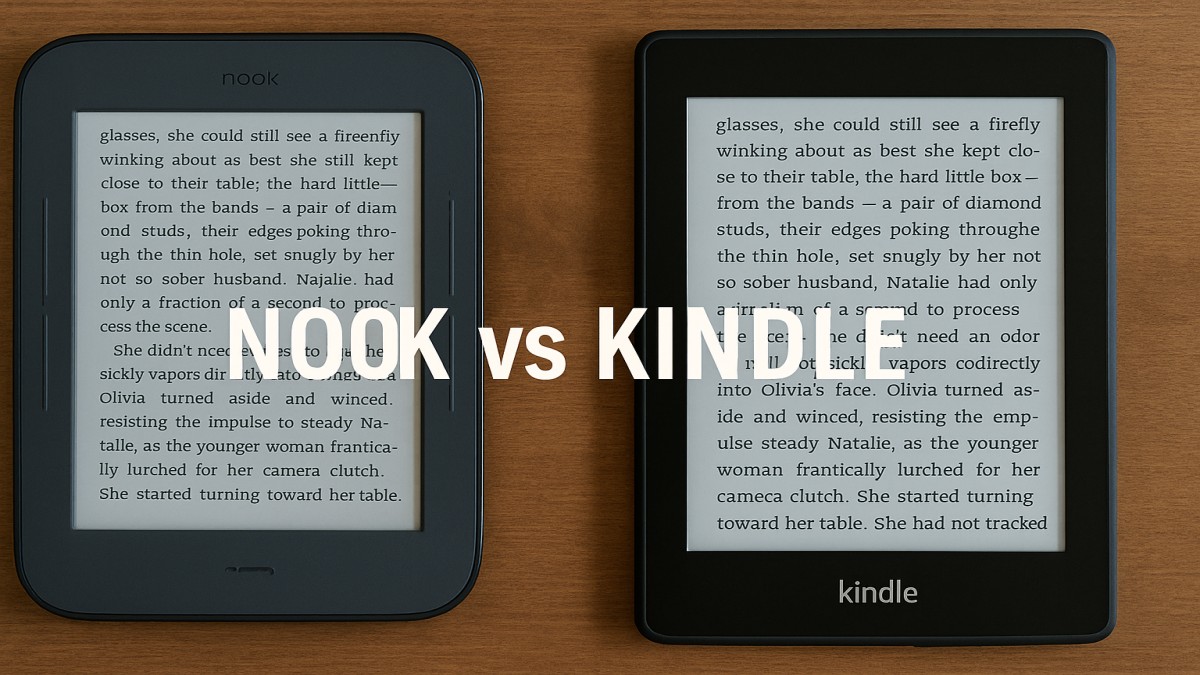
If you love reading, chances are you’ve thought about getting an e-reader. But with two big names dominating the scene Amazon’s Kindle and Barnes & Noble’s Nook how do you choose? Both offer great features, sleek designs, and access to massive libraries. But the differences might surprise you.
Let’s dive into the battle of Nook vs Kindle to see which one truly fits your reading lifestyle.
Brand Background
What is the Kindle?
Kindle is Amazon’s brainchild, first launched in 2007. It’s evolved into a powerful reading device with multiple models—Basic, Paperwhite, Oasis, and Scribe. Kindle is known for its clean design, massive content library, and seamless Amazon integration.
What is the Nook?
Barnes & Noble launched the Nook in 2009. While it doesn’t have the same international reach as Kindle, it offers a more bookstore-style experience. The Nook GlowLight models are their current flagship e-readers.
Design and Build Quality
Nook’s Physical Features
Nook devices are lightweight with soft-touch backs that feel cozy in hand. Their page-turn buttons are a favorite among traditional readers who love tactile controls.
Kindle’s Sleek Design
Kindles lean toward a minimalist design. Especially the Paperwhite and Oasis, which offer flush-front displays and a premium feel. The Oasis even has a wedge-shaped ergonomic design for one-handed reading.
Durability and Portability
Both brands are portable, but Kindle wins for having more waterproof options (IPX8-rated). Great for reading in the bath or by the pool.
Screen and Display
E-Ink Technology Explained
Both Nook and Kindle use E-Ink screens, making the reading experience mimic paper and reduce eye strain.
Backlighting and Adjustable Warm Light
Kindle Paperwhite and Oasis come with adjustable warm light for night reading. Nook GlowLight 4 and 4e also offer similar features, though less refined.
Screen Size and Resolution Comparison
- Kindle Paperwhite: 6.8″ with 300 ppi
- Nook GlowLight 4: 6″ with 300 ppi
- Kindle Oasis: 7″ with 300 ppi
Kindle generally offers more options for those who like bigger or higher-resolution screens.
User Interface and Experience
Kindle’s Simple UI
Kindle’s interface is intuitive, minimal, and easy to use. Everything feels connected, especially if you’re used to the Amazon ecosystem.
Nook’s Touch Navigation
The Nook interface feels more like browsing a bookstore. Some users love the familiarity; others find it slightly outdated.
Ease of Use for All Ages
Both are user-friendly, but Kindle takes the win for simplicity and speed.
Content Availability
Kindle Store and Amazon Integration
With millions of books, plus exclusive Kindle-only titles and authors, Kindle has the edge. You also get integration with Amazon services like Goodreads and Audible.
Nook Store and Barnes & Noble Ecosystem
Nook has a decent library, especially for mainstream and literary titles. However, it lags behind Kindle in indie author content and variety.
Support for ePub and Other Formats
Nook supports ePub natively—a huge plus. Kindle now supports ePub too, but only via conversion. Kindle uses proprietary formats like AZW and MOBI.
Ecosystem and Services
Kindle Unlimited and Prime Reading
These give you access to thousands of titles for a subscription or for free if you’re a Prime member.
Nook’s Free Friday and LendMe Feature
Free eBooks every Friday and the ability to lend books to friends are nice Nook perks, though less comprehensive than Kindle’s offerings.
Cloud Storage and Cross-Device Syncing
Kindle has superior cloud syncing across devices—pick up where you left off whether you’re on your phone, tablet, or Kindle.
Battery Life
Kindle’s Long-Lasting Power
Kindle devices can last weeks on a single charge—thanks to efficient E-Ink screens.
Nook’s Battery Performance
Nooks also hold their own, offering similar battery life, though less consistent with heavy use.
Conclusion
So, Nook vs Kindle—who wins? It really depends on your needs. Kindle has the edge in content, services, and features. But if you prefer an open system and the cozy feel of a local bookstore, Nook might just steal your heart.
Bottom line? Both are excellent, but Kindle gives you more bang for your buck—especially if you’re already in the Amazon universe.
FAQs
1. Can I borrow library books on both Nook and Kindle?
Yes, both support borrowing via OverDrive, though the Nook handles it more natively.
2. Is Kindle more popular than Nook?
Absolutely. Kindle dominates the e-reader market, thanks to Amazon’s reach.
3. Which one supports more file formats?
Nook, since it supports ePub without conversion.
4. Do either of them work without Wi-Fi?
Yes! You can read downloaded books offline on both.
5. Can I read comics or PDFs on these devices?
Yes, but larger PDFs display better on bigger screens like Kindle Oasis or Scribe.

How to Start a Pet Grooming Business: Simple Steps That Turn Your Love of Animals Into Income

How to Start a Car Detailing Business: Simple Steps That Turn Your Skills Into Income

How to Start a Pressure Washing Business: A Simple Guide That Gets You Your First Customers

How to Start a Lawn Mowing Business: Simple Steps That Turn Mowing Into Income

How to Start a Dog Walking Business: Simple Steps That Turn Walks Into Income

How to Start a House Cleaning Business: Simple Steps That Win Your First Clients

How to Pay Employees in Your Small Business: Simple Steps That Get It Right

How to Do Market Research for Small Business: Simple Steps That Find Your Customers

How to Start a Tutoring Business: Simple Steps That Turn Your Knowledge Into Income

How to Create a Digital Product to Sell: A Simple Guide for Small Business Beginners

How to Repurpose Blog Content for Social Media Without Starting From Scratch

How to Write a Simple Business Plan for Your Small Business: A Practical Guide That Gets You Started

How to Create a Small Business Content Marketing Plan That Actually Gets Results
How to Handle Customer Complaints in a Small Business: A Calm, Practical Guide That Turns Problems Into Loyalty

How to Get More Clients for Your Business: Simple Ways That Actually Work

How to Write a Professional Business Email That Gets a Reply

How to Create a Content Calendar for a Small Business

How to Set SMART Goals for a Small Business: A Practical Guide That Actually Works

How to Set Up a Simple Referral Program for Your Small Business: A Beginner’s Guide That Brings in New Customers

How to Write a Business Proposal for Your Small Business: A Simple Guide That Wins Clients

How to Start a Pet Grooming Business: Simple Steps That Turn Your Love of Animals Into Income

How to Start a Car Detailing Business: Simple Steps That Turn Your Skills Into Income

How to Start a Pressure Washing Business: A Simple Guide That Gets You Your First Customers

How to Start a Lawn Mowing Business: Simple Steps That Turn Mowing Into Income

How to Start a Dog Walking Business: Simple Steps That Turn Walks Into Income

How to Start a House Cleaning Business: Simple Steps That Win Your First Clients

How to Pay Employees in Your Small Business: Simple Steps That Get It Right

How to Do Market Research for Small Business: Simple Steps That Find Your Customers

How to Start a Tutoring Business: Simple Steps That Turn Your Knowledge Into Income

How to Create a Digital Product to Sell: A Simple Guide for Small Business Beginners
Trending
entertainment1 year agoPYT Telegram: A Complete Guide to Understanding, Using, and Maximizing It
entertainment1 year agoOnionFlix: Everything You Need to Know About This Streaming Website
education1 year agoHow to Become a Software Engineer: A Complete Guide
entertainment10 months agoBrainrot Memes: The Unhinged Humor of the Internet Generation