
Technology
Chromecast Audio — What It Was, How It Worked, and What to Use Now

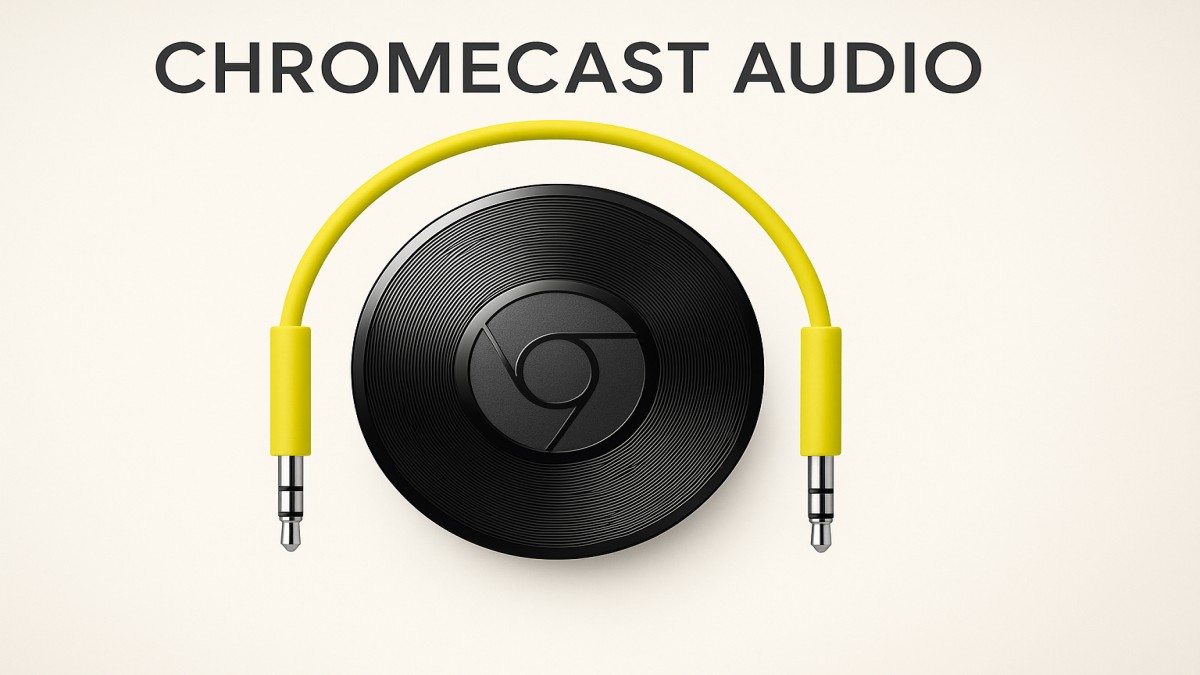
Chromecast Audio was Google’s elegant little device that turned any set of powered speakers or an AV receiver into a Wi-Fi smart speaker. Launched in 2015 and quietly discontinued in 2019, it left a loyal following because it solved a familiar problem simply: stream music from your phone, tablet, or laptop to good speakers without Bluetooth hassles. This article explains what Chromecast Audio did, how it worked, why people loved it, and what your best options are today.
What was Chromecast Audio?
Chromecast Audio was a puck-sized dongle with a 3.5 mm audio jack (and support for optical audio via a mini-TOSLINK adapter). Instead of pairing over Bluetooth, it connected to your home Wi-Fi network and used Google’s “Cast” protocol to stream audio directly from apps like Spotify, Google Play Music, Pandora, and YouTube Music. That meant better range, multi-room sync, and the ability to control playback from multiple devices.
How did it work?
In simple terms:
- Network streaming — The Chromecast Audio joined your Wi-Fi network and accepted a stream or instructions from an app on your phone. The app acted as a remote control; the heavy lifting (actual audio streaming) happened over Wi-Fi.
- App casting — Apps with Cast support showed a cast icon. Tap it, choose the Chromecast Audio, and audio shifted from your device to your speakers.
- Multi-room audio — Multiple Chromecast Audios could be grouped in the Google Home app to play the same audio in sync across rooms.
- High-quality output — Compared to Bluetooth, Wi-Fi streaming provided more stable bandwidth and better fidelity (and less latency), making it ideal for hi-fi setups.
Can you still use a Chromecast Audio?
Yes—if you already own one, it will typically continue to work. Google deployed automatic firmware updates while the device was supported, and many functionality layers (Cast protocol, Google Home app) remain functional. However, because it’s discontinued:
- It may no longer receive updates indefinitely. That could affect future compatibility.
- New purchases are rare. You might find used units on resale sites, but consider risks around longevity.
Alternatives today
If you don’t have a Chromecast Audio, there are several modern alternatives:
- Chromecast built-in speakers / Nest devices. Many current smart speakers natively support Cast and offer a similar experience with voice controls.
- High-quality network audio players. Brands like Bluesound and Sonos support multi-room, streaming apps, and better fidelity for audiophiles.
- AirPlay (Apple) or Spotify Connect. If you’re in another ecosystem, these protocols offer the same “networked” streaming benefits.
- Hi-fi DACs and streamers. For true audiophile setups, dedicated streamers offer advanced formats and better digital-to-analog conversion.
Troubleshooting tips (if you’re using an old Chromecast Audio)
- Keep the Google Home app updated. That’s the control center for casting and device groups.
- Use a reliable Wi-Fi network. Wi-Fi quality is critical—position your router or use mesh extenders for better coverage.
- Check inputs. If the 3.5 mm connection sounds noisy, try an optical adapter (mini-TOSLINK) for a cleaner digital feed.
- Reboot devices. Power-cycling the Chromecast Audio, router, and speakers often solves glitches.
Is Chromecast Audio still worth it?
If you own one and it works with your current apps, absolutely. For many, it remains the easiest and most cost-effective way to add Wi-Fi streaming and multi-room capability to legacy speakers. If you’re buying new, evaluate current Cast-enabled speakers or dedicated streamers depending on your budget and audio expectations.
FAQs
1. Does Chromecast Audio work with Spotify?
Yes—Spotify supported Cast, so you could cast directly from the Spotify app to Chromecast Audio.
2. Can Chromecast Audio do Bluetooth?
No. Chromecast Audio was designed to stream over Wi-Fi; it did not act as a Bluetooth receiver.
3. Can I group Chromecast Audio with Nest speakers?
Yes—if the devices are on the same Google Home account and network, you could create speaker groups across compatible devices.
4. Is the Chromecast Audio better than Bluetooth?
For stability, range, and multi-room sync, yes—Wi-Fi casting generally offers superior performance to standard Bluetooth audio.
5. What if Google stops supporting Chromecast Audio entirely?
It may continue to function but could lose features over time. For long-term reliability, consider switching to a supported Cast-enabled speaker or a modern network audio player.

Freelance Jobs for Beginners USA (Start with No Experience)

Side Hustle Ideas from Home USA (No Experience Needed) – Beginner’s Guide

Online Jobs from Home USA (Daily Pay) – Start Earning Instantly

Beton Celular Autoclavizat: The Future of Lightweight, Eco-Friendly Construction

Goblets: A Timeless Symbol of Elegance and Celebration

AI Tools for Making Money Online Free (Best 2026 Guide)

Passive Income Apps USA Free: Earn Money Effortlessly in 2026

How to Earn Money from Home Without Investment

ChatGPT Alternatives Free No Login (2026 Guide)

Everything You Need to Know About Koeas

Ishraq Time in Delhi: What It Is, When It Happens, and Why It Matters
Beton Celular Autoclavizat: The Future of Lightweight, Eco-Friendly Construction

Read OPM Manga Online: Where and How to Enjoy One Punch Man Legally

Technisches Gymnasium: Your Gateway to Engineering and Technology

Why Every Small Business Needs a Digital Marketing Agency
Goblets: A Timeless Symbol of Elegance and Celebration

Gold Shower: Nature’s Cascading Yellow Wonder

The Indian Bow: A Legacy of Precision, Power, and Tradition

Robert Provost: A Life of Leadership, Community, and Vision

Are Political Donations Tax Deductible?
Freelance Jobs for Beginners USA (Start with No Experience)
Side Hustle Ideas from Home USA (No Experience Needed) – Beginner’s Guide
Online Jobs from Home USA (Daily Pay) – Start Earning Instantly
Beton Celular Autoclavizat: The Future of Lightweight, Eco-Friendly Construction
Goblets: A Timeless Symbol of Elegance and Celebration
AI Tools for Making Money Online Free (Best 2026 Guide)
Passive Income Apps USA Free: Earn Money Effortlessly in 2026
How to Earn Money from Home Without Investment
ChatGPT Alternatives Free No Login (2026 Guide)
Everything You Need to Know About Koeas

 entertainment7 months ago
PYT Telegram: A Complete Guide to Understanding, Using, and Maximizing It

 entertainment7 months ago
OnionFlix: Everything You Need to Know About This Streaming Website
- others6 months ago
Nook vs Kindle: Which E-Reader Is Right for You?
- gaming7 months ago
Melisandre: The Enigmatic Priestess of Game of Thrones




